What's new in Coldlytics
Every change a customer would notice, newest first. Subscribe by RSS, or read the monthly recap in your inbox.
RSS feedIntegrationsDevelopers & MCP
October 2026
Person filters and one contact per company on the Contacts page
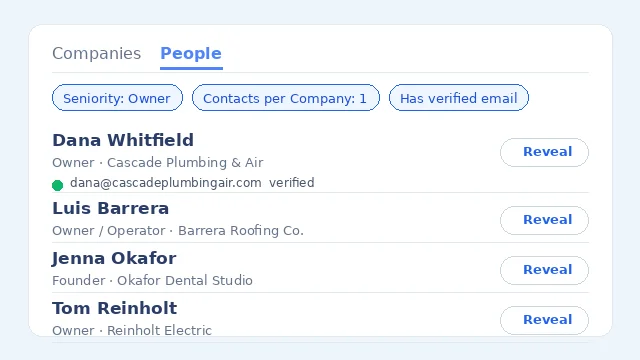
Your Contacts page now has the same person filters as the People tab: job title keywords, department, seniority, contact data and Contacts per Company. Set Contacts per Company to 1 and send to your sequencer or CRM to push exactly one person per business, and sends of everything matching a filter are no longer capped at 5,000 contacts.
Minimum headcount and revenue filters are now exact
A minimum headcount or revenue only returns companies whose figure is on file and meets it. Previously companies we had no figure for could slip through a minimum, which is how a 20+ employee list ended up with much smaller businesses in it. Maximums still include companies we could not size.
Type any headcount or revenue range
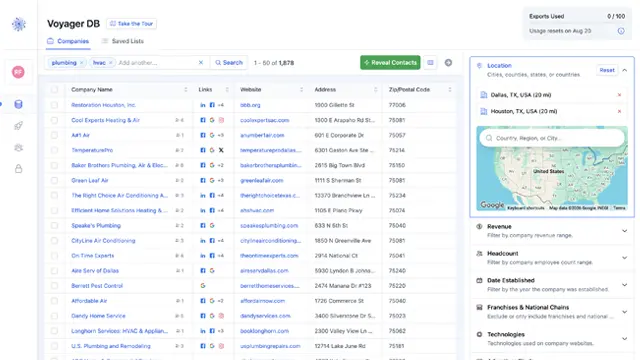
The Headcount and Revenue filters in Voyager DB, Contacts and task creation now take any number you type, such as 20 to 100 employees or 1.5m in revenue, instead of a fixed list of steps.
Filter trades by who they serve
Home services and trades in Voyager DB now carry a customer type: residential, commercial or both, read from each company's website. Tick Residential or Commercial under the Categories filter on the Companies or People tab, and add the Customer Type column to see it in your results and exports.
Filter by Google review count and rating
The Google Business Profile filter has review count and rating ranges, so you can target businesses with few reviews or a low rating, a common sign they need marketing help. It applies to the listing in the area you searched and works on both the Companies and People tabs.
TikTok advertisers in research tasks and the API
Research tasks can now filter companies by whether they run TikTok ads, alongside Facebook, Google and LinkedIn. The API and MCP search tools accept an ad_pixels filter for all four platforms.
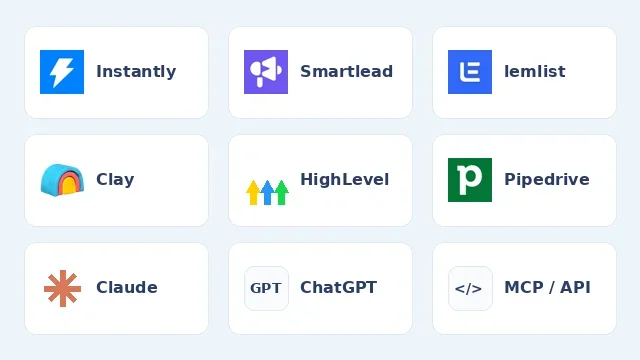
Send contacts to Instantly, Smartlead, lemlist and Clay
Connect your outreach tool with an API key, then send contacts straight into a campaign from the Contacts page. You can also send contacts to a Clay table as new rows. No CSV exports needed.
One contact per company in People search
A new Contacts per Company filter caps how many people each business can list, so a search can return one decision maker per company. People at a branch of a larger business now also show that branch's own name.
Suppression lists you manage yourself
Add the emails and companies you already have to a suppression list in Settings, by pasting them in or uploading a CSV. Research tasks and the Voyager DB deduplicate filter leave them out, and each task can also carry its own list, with no Google Sheets to share.
Flag leads that are not right
Select contacts on the Contacts page and flag them if an email bounced, the person has moved on, or the lead does not match your targeting. We review every request and return the credits for leads that were not up to standard.
September 2026
Target residential or commercial trades
Research tasks for home services and trades have a new filter: choose companies that serve homeowners, businesses, or both. We read each company's website to work it out.
Cleaner company and contact names
Company names now show the name a business trades under, without legal suffixes or the extra wording businesses add to their Google listing. Contact names and job titles are tidied the same way, so what you export is ready to use.
Filter Voyager DB by ZIP code
Paste a list of ZIP or postal codes into the Location filter, or a range like 11933-11978, to target exactly the areas you sell into. It works for company and people searches, Contacts, and research tasks you launch from a search.
Use Coldlytics from Claude, ChatGPT and other AI assistants
Coldlytics is now an MCP server: connect it to Claude, ChatGPT, Claude Code or Cursor and ask your assistant to find companies, look up decision-makers, reveal verified emails and launch research tasks. There is a new public API with named keys and full documentation too.
Coldlytics works on your phone
Every page now fits a phone screen: log in, search Voyager DB, open filters, reveal contacts, check tasks and manage billing from wherever you are. Result tables scroll sideways and their columns can be resized with a finger.
Search people directly in Voyager DB
Voyager DB has a new People tab. Search the people we already hold at companies matching your filters, narrow them by job title, department, seniority or the contact data on file, and reveal their verified email or direct dial straight from the results. Your company filters carry across between the Companies and People tabs.
Filters always in view, applied as you go
Voyager DB and Contacts now keep the filters and search in a resizable column on the left, visible on every screen size. Changes apply on their own, so there is no Apply button to click. Technologies, ad pixels and social profiles use the same include or exclude picker as categories, Google review scores show as star ratings, and the default columns put the most useful data first.
Filter Voyager and your Contacts by business category
Every company is now classified into one of 325 business categories (plumbing, dental practices, law firms and so on), organised under 20 broad groups. The new Categories filter lets you include or exclude whole groups or specific trades to build a list without guessing keywords, and every company profile shows its categories so you can pivot to its peers in one click. The search assistant and the first-run "Who's your customer?" prompt now pick categories for you. A Categories column is available in the results grid and CSV export.
Reveal contacts across your whole search, and watch it happen
Instant reveals now cover every company matching your Voyager search (no more top 5,000) and a single run is no longer limited to 1,000 contacts. Progress lives in a small corner panel you can check from anywhere in the app, cancel at any time, and new contacts appear in your Contacts list as they land. A new Reveals page keeps the history of every run.
August 2026
See every email and phone number we have for your contacts
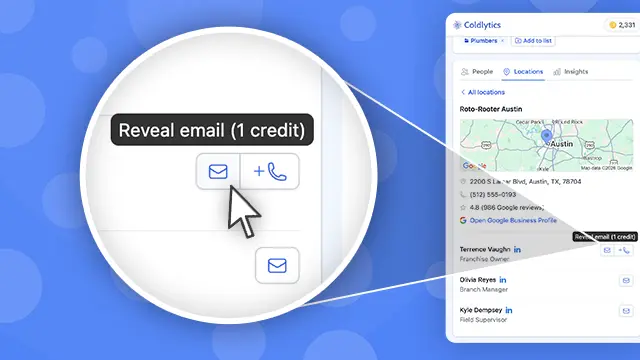
Contacts now show all their known emails and direct dials in one place: your CRM, exports and Voyager. Own a contact already? Reveal any additional email or dial for 1 credit each.
Direct dials now cost 1 credit
Adding a direct dial to an instant reveal now costs 1 credit instead of 3, the same price as an email. Phone-first outreach just got a lot cheaper.
Team seats: invite your teammates
Give teammates their own login to your workspace. Everyone shares your lists, contacts and credits, and you control which seats can launch research, reveal contacts, or access billing. Every paid plan now includes team seats, and you can add more from Settings.
Deduplicate searches against your saved lists
The Deduplication filter in Voyager now has a second switch that hides companies you have already saved to any of your lists, so every search surfaces only companies you have not collected yet.
July 2026
Filter contacts by date added
A new Date Added filter in your Contacts lets you narrow to contacts added in any date range, for example everything from last week's research. Exports respect the filter too, and all exported dates are now in UTC.
Search several niches at once
The Voyager search bar now takes multiple keywords. Type a comma to add each one as a pill, and your results will cover every niche in one search, like plumbing, roofing and HVAC together.
Tell us who you sell to, we'll build your first search
New to Voyager? Describe your ideal customer in plain language and we'll turn it into a ready-made search with the right keyword and filters. A short walkthrough then points out where the filters and contact reveal live.
Look up companies by website URL
Paste a website URL or domain into the Voyager search bar to jump straight to that exact company. No more guessing which of five same-named businesses is the right one.
Send companies straight to Contact Research
Selected companies and saved lists can now go directly to our research team, no instant reveal needed first. Look for Send to Contact Research in the selection menu and in every saved list's action menu.
A more powerful technology filter
Find platforms by typing their name, exclude technologies as well as include them, and combine rules with AND or OR. Full platform names now show in the dropdown too.
Hand any search to our research team in one click
When our database has given you everything it can, one click sends the rest of your search to our human researchers. Your filters, locations and industry carry over automatically, and the finished contacts arrive already tagged.
Clearer bulk reveal costs, including direct dials
The reveal dialog now shows exactly what you'll get and the most it can cost before you commit, and your final spend never exceeds that quote. Direct dials are only ever bought for contacts revealed in that run.
Deliver research tasks straight into a tag
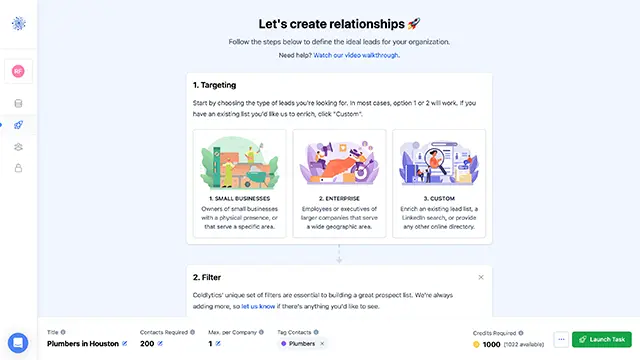
Pick a tag when launching any research task and every delivered contact lands in it automatically, ready for your campaign.
Bulk contact reveal
Reveal contacts for up to 1,000 companies in one go. You only pay for verified valid emails, and already-owned or catch-all contacts land free.
Tag contacts as you reveal them
Assign a tag at the moment you reveal contacts, and your last-used tag sticks as the default. Perfect for keeping campaigns and clients separated from the start.
Seniority and department on every contact
Every contact is now classified by seniority (owner, director, manager and more) and department, so you can filter straight to the decision-makers.
June 2026
New Voyager filters: franchises and business age
Exclude (or target) franchises and national chains, and filter companies by the date they were established.
Instant contact reveals
Found the right company in Voyager? Reveal a verified email address on the spot for 1 credit, only charged when the email is valid. Catch-alls are revealed free, and direct dials cost 3 extra credits.
Faster Voyager search
Large searches return noticeably faster, especially when combining filters over big areas.
HighLevel integration
Send contacts directly to HighLevel, with support for multiple sub-accounts and custom field mapping.
Try the latest with 25 free credits a month.
By signing up, I agree to Coldlytics' Terms of Service and Privacy Policy.