Integrations
Verified contacts, delivered where you work
Send decision-makers straight into your sequencer, CRM or Clay table, or let Claude, ChatGPT and your own code prospect for you through the Coldlytics MCP server and API. No CSV round trips.



By signing up, I agree to Coldlytics' Terms of Service and Privacy Policy.
 Instantly
 Smartlead
 lemlist
- HighLevel
 Pipedrive
 Clay
Clay- CSV export
- Claude
- ChatGPT
- Claude Code
- Cursor
- REST API v3
- Chrome extension
- 1 click
- from a filtered Contacts list to a live campaign
- 0 CSVs
- needed between Coldlytics and your sequencer, CRM or Clay table
- Same credits
- whether you reveal from the dashboard, Claude, ChatGPT or the API
Outreach tools
Send verified contacts straight into a campaign from the Contacts page. No CSV round trip.
Instantly
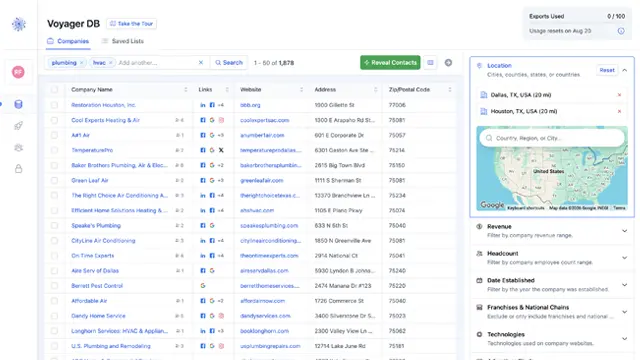
Pick a campaign and the contacts you have filtered or selected land in it as leads, with company, website, city, state and LinkedIn as merge variables. Set Contacts per Company to 1 first to push exactly one decision-maker per business.
Connect: Paste an Instantly API key with access to campaigns and leads.
Smartlead
Choose a Smartlead campaign and send everything matching your Contacts filters, or just the rows you ticked. Job title, city and state arrive as custom fields for your templates, and the direct dial goes along when you have revealed one.
Connect: Paste your Smartlead API key (Smartlead's Pro plan or higher).
lemlist
Send verified contacts into a lemlist campaign in one click from the Contacts page, ready for email, LinkedIn and call steps. Direct dials travel with the contact when you have revealed them.
Connect: Generate an API key under lemlist Settings, then Integrations, and paste it in.
How sending works
- Send whatever your Contacts filters match, or just the rows you tick
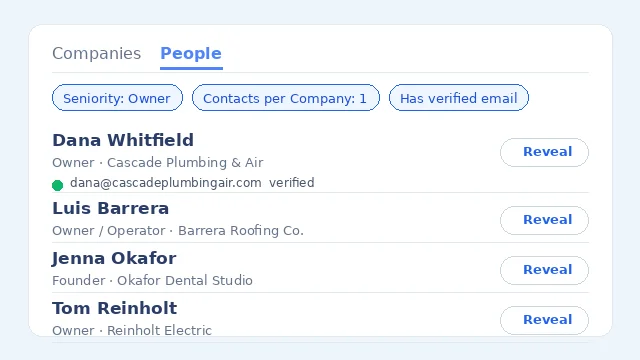
- Contacts per Company set to 1 pushes one decision-maker per business
- Sequencers and CRMs match on email, so a re-send tops up a campaign without duplicates
- Every push is logged in Sync History with the destination and the outcome
CRMs
Push contacts and their companies into the CRM your team or your clients already run.
HighLevel
Connect your agency account once, then send contacts into whichever sub-account a client lives in. Map job title and LinkedIn profile to custom fields so every push lands ready for workflows and pipelines.
Connect: Connect with your HighLevel agency login from the Coldlytics dashboard, then pick the sub-account each time you send.
Pipedrive
Contacts arrive as people linked to their organisation, with job title and LinkedIn mapped to the custom fields you choose. Companies you already track are matched, not duplicated.
Connect: Connect with your Pipedrive login from the Coldlytics dashboard.
Data and automation
Feed Coldlytics data into enrichment workflows, or take it anywhere as a CSV.
Clay
Add a webhook source to any Clay table, paste its URL, and every contact you send becomes a row: name, job title, verified email, direct dial, LinkedIn, company, domain, full address and your tags. Connect as many tables as you like, one per client or workflow.
Connect: Paste the webhook URL from your Clay table, plus its auth token if you set one.
CSV export
Download whatever your Contacts filters match, or a selection, as a CSV with every email, dial and company data point. Contact exports never cost credits and never count against a limit, on Freemium too.
Connect: Nothing to connect: Export from the Contacts page.
AI assistants
Coldlytics is an MCP server. Connect it once and your assistant can search, reveal and research on your behalf, at the same credit prices as the dashboard.
Claude
Connector directory listing pending
Add Coldlytics as a connector and Claude can search companies and people, look up a domain, reveal verified emails and direct dials, read your Contacts and launch research tasks, asking before anything spends credits.
Connect: In Claude, open Customize, Connectors, Add custom connector, and paste the MCP server URL. Sign in with your Coldlytics account.
ChatGPT
App directory listing pending
Connect Coldlytics in ChatGPT's developer mode and ask it to size a niche, pull the owners at matching companies or look up a company by domain. Reveals and research launches need a Business or Enterprise workspace, where ChatGPT allows write tools.
Connect: Settings, Connectors, Advanced, enable Developer mode, then create a connector with the MCP server URL and OAuth.
Claude Code
Run claude mcp add once and Claude Code can enrich a list of domains, build a prospect file or launch research from inside your project.
Connect: claude mcp add --transport http coldlytics https://mcp.coldlytics.com/mcp, then /mcp to sign in.
Cursor and other MCP clients
Cursor, n8n, custom agents and anything else that speaks the Model Context Protocol connects to the same server. Clients that cannot do OAuth send a named API key instead, scoped to just what they need.
Connect: Add the server URL to your MCP config with an Authorization: Bearer header holding an API key.
Connect in a minute
Server URL: https://mcp.coldlytics.com/mcp. Sign in with your Coldlytics account, or use an API key for clients that cannot do OAuth. Tools that spend credits are marked, so your assistant asks before running them.
- Claude
- Customize, Connectors, Add custom connector. Paste the server URL and sign in with your Coldlytics account.
- ChatGPT
- Settings, Connectors, Advanced, enable Developer mode. Create a connector with the server URL and OAuth.
- Claude Code
- claude mcp add --transport http coldlytics https://mcp.coldlytics.com/mcp, then /mcp to sign in.
- Cursor and others
- Add the server URL to your MCP config with an API key in the Authorization header.
Developers
Build your own integration on the same engine the dashboard and the MCP server use.
REST API v3
Named API keys with scopes, an OpenAPI 3.1 document, idempotent credit-spending calls and webhooks when research is delivered. Search, people search, reveals, contacts, research tasks and your suppression list are all there.
Connect: Create a key under Integrations, API & MCP in the dashboard.
Browser
Coldlytics where you already are: beside any business website.
Chrome extension
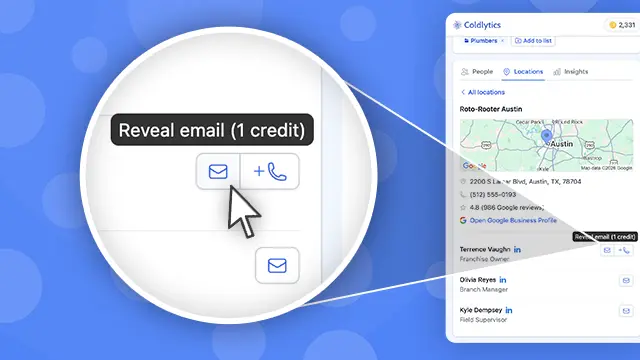
A side panel that recognises the business you are looking at, shows its profile and decision-makers, and reveals verified emails and direct dials without leaving the tab.
Connect: Install from the Chrome Web Store and sign in once.
FAQs
Have a question that's not answered here? Ping us via the chat.
Do integrations cost extra?
+
No. Every integration, the MCP server and the API are included on every plan, Freemium too. Credits are spent only when you reveal a contact or launch research, at the same price everywhere: 1 credit per verified email, 1 per direct dial, 5 per hand-researched contact.
Which contacts get sent?
+
Whatever the Contacts page is showing. Filter by task, tag, date added, job title, department, seniority or company, tick specific rows if you like, and choose Send to. With nothing ticked, everything matching the filter goes. Set Contacts per Company to 1 to push a single decision-maker per business. The help article walks through connecting each tool.
What data travels with each contact?
+
Name, job title, verified email and its status, direct dial when you have revealed one, LinkedIn profile, company name, website, phone, address, revenue, headcount, and for Clay the full set of firmographic and web-presence fields. CRMs get job title and LinkedIn mapped to the custom fields you pick.
Can I connect more than one account or campaign?
+
Yes. Connect several HighLevel sub-accounts, several Clay tables or several sequencer accounts, and pick the destination each time you send. Agencies typically keep one destination per client.
Are the Claude and ChatGPT connectors official?
+
Coldlytics runs its own MCP server, and both Claude and ChatGPT connect to it today as a custom connector with your Coldlytics login. Our listings in the Claude connector directory and the ChatGPT app directory are submitted and awaiting approval; once they are live the custom-connector step disappears. Step-by-step setup for each assistant is in the MCP help article.
What about HubSpot, Zapier or a tool that is not listed?
+
Any tool that can call a REST API or act as an MCP client can use Coldlytics through the API, and a CSV export is always free. Tell us which integration you need via the chat and we will let you know where it sits on the roadmap.
Connect your stack and start prospecting
Every integration is included on every plan. Freemium gives you 25 credits a month, forever, no card required.
By signing up, I agree to Coldlytics' Terms of Service and Privacy Policy.