How to Find CEO, Founder & Owner Contact Info for Free
14 free ways to find the email address and phone number of any CEO, founder, or business owner using public team pages, filings, WHOIS records, and more.
 Matthew McQuinn· · Updated

I've made a career out of finding CEO email addresses, and there are fewer things more valuable to the growth of your company than mastering this skill!
Nowadays, I find addresses in bulk (that's what Coldlytics does!), but I didn't always. I used to spend my time hunting for CEO and founder email addresses for free in order to grow my M&A pipeline.
I know firsthand that:
- It's not easy.
- There isn't a 100% success rate.
- You'll need different tools in your belt to maximize your success rate.
The short version: most CEO, founder, and owner contact information is publicly available if you know where to look. The highest hit rates come from the company website's team page, LinkedIn, WHOIS records, public filings, and simply guessing the email format and verifying it, or you can have a service like Coldlytics research and verify the contact for you. Below are all 15 methods I've personally used, including how to find phone numbers as well as email addresses.
1. Visit the Company Website
The highest hit rate usually comes from searching the company's website! Smaller websites often have CEOs who are willing to be more customer facing, meaning they might post their email directly on the website.
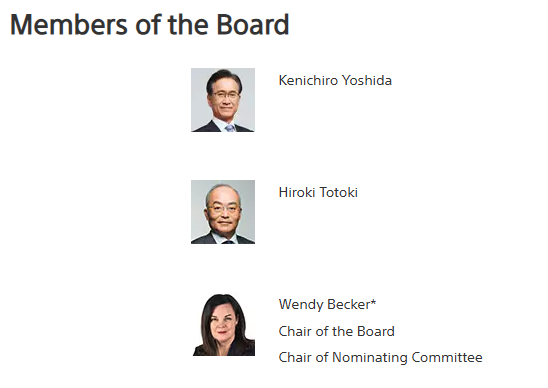
Check the "About Us" or team page and you might be able to grab an email address (or, if not, perhaps a social media handle or phone number).
Larger companies are less likely to share a CEO's email address on a public team page, but you can often at least confirm who the top decision-maker is. Then, you can pair this with another strategy on the list to find an email address.
Here's how that looks on Sony's website:
2. Check Their LinkedIn Profile
Doing this for free is going to hamstring you a little bit, but it can be done! First, it's a great place to verify that you've actually found the right person, as they'll typically list their job role.
If you're lucky, they'll put their email address right in their contact info. Here's what that looks like on my profile:

I don't have my email address when you view my contact info, but sometimes you can get lucky and find that a CEO or founder has put theirs in.
And if it isn't there, you still have other options.
If it's a specific CEO that you're set on reaching, you could always try to Connect with them. You could follow them and start commenting on their posts (with real, insightful stuff) and then even hope they'll accept an invitation to Connect.
Also, check if anyone in your current network happens to be connected to that person already. Perhaps they can help you make an introduction.
3. Use Google Search Operators
A simple Google search isn't likely to find what you need (unless you get lucky), but with their search operators, you can greatly increase the odds of finding what you're looking for.
Once you have the CEO's name, try these:
- "John Smith" email
- "John Smith" contact info
- site:company.com AND "email" AND "CEO"
- site:realtor.com AND "John Smith"
The "site:" search operator will force Google to only search on that site. You don't have to do this only with their company site, you could try LinkedIn or an industry database as well.
There are dozens of permutations of just what I listed above. Get creative and keep trying!
4. Guess the Email Format, Then Verify It
Most companies use a predictable email format. Once you have the CEO, founder, or owner's name (which the first three methods will almost always get you), you can usually construct their address:
- first@company.com (very common for founders and small business owners)
- firstname.lastname@company.com
- flastname@company.com
If you can find any employee's email address (in a press release, a job posting, or a signature), you've almost certainly found the format the whole company uses.
Then verify your guess before you send anything. Plenty of email verification tools will check a handful of addresses for free, and bouncing emails off a domain damages your sender reputation, so never skip this step. Our Chrome extension can also pull verified contact details for the businesses you're browsing.
One warning: skip generic inboxes like info@ or hello@. A generic email address rarely reaches the decision-maker.
5. Press Releases & News Articles
Companies often put out press releases when changes happen at the company, such as a merger, there's a new member of the C-Team, or a company-wide service project. Sometimes, these press releases will have the CEO's name and contact information on them, and often a direct media contact email that reveals the company's email format.
Many companies will have their press releases distributed, but they often post them on their own website as well. Check there first, but then also look for news sites or magazines focused on the company's niche.
At OpenAI, they released an article announcing their new CEO:

6. Check the Domain's WHOIS Record
Every domain name has a public registration record, and for small businesses, the person who registered the domain is very often the founder or owner themselves.
Run the company's domain through any WHOIS lookup tool (ICANN has an official one). Privacy services redact a lot of records these days, but business domains registered years ago frequently still show a real name, email address, and phone number.
This is one of the few free methods that regularly turns up a phone number as well as an email, so it's worth the 30 seconds it takes.
7. Read Through Public Filings & Registrations
While it's a bit of grunt work, you might get lucky and find contact information in publicly available company filings. For public companies, you can start your search using the SEC's EDGAR system.
For small businesses, look for the registration documents on the Secretary of State's website. They typically keep records of all registered businesses, and the registered agent or officer listed is often the owner, complete with a mailing address and sometimes an email or phone number.
8. Google Business Profile & Reviews
If you're having trouble even finding the name of the CEO or owner, this can be a great under-the-radar way to confirm who's in charge.
Check the company's Google Business Profile first. The listed phone number for a small business often rings the owner directly, and when the business replies to reviews, you'll see "Response from the owner" with a name attached.
Then keep an eye out for mentions in the reviews themselves, such as "Mike, the owner, really stepped up when..." or "John helped out even though he's the CEO."
9. Check Social Media (Especially X)
Many CEOs don't even realize that they've put their email address in a place where the public can see! What I've also found is that you can sometimes find a personal X (Twitter) account for the CEO. They're much more likely to make their email publicly available there.
For smaller companies, the CEO may just post their email address, especially if they're a freelancer, coach, or another type of solopreneur.
10. Search Business Directories & Niche Databases
Many industries keep a list of people in their industry, sometimes with available contact information. Real estate agents are a good example, as you can search for real estate agents or an entire office.
On NAR's website (National Association of Realtors), they make it convenient to search their directory:

Doing a quick search for offices in Utah gives you more than 1,000 results:
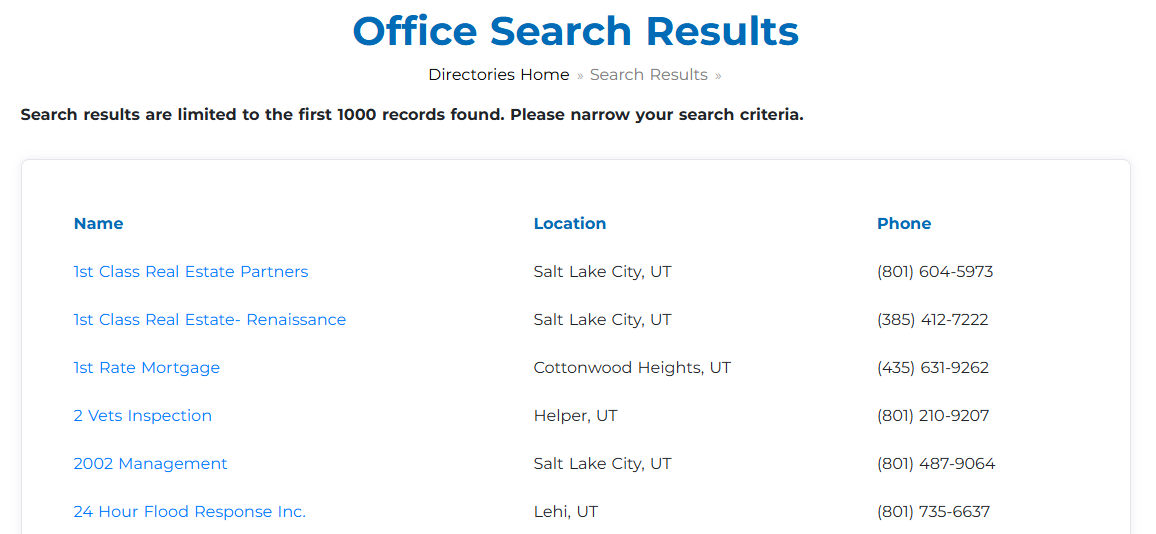
When you click any of those, you'll get a name for the designated Realtor, Office Contact and a phone number. It's not an email, but it's still a good deal of information you can get for free in a few seconds.
Now, real estate agents are an easy sector for this search because agents want to be found, unlike many other industries. It doesn't hurt to do a quick Google search to find industry databases and see what information is available for CEOs.
11. Find Old Job Postings
If the CEO hasn't always been the CEO of the company, it's possible that he or she was the hiring manager for a role in the past. Sometimes, job postings will say something like "please send your resume to john@company.com" or "if you have questions about the role, please reach out to john@company.com."
Again, it's a bit of a long shot, but piecing together several of these strategies can dramatically increase the odds of finding a CEO's email address for free.
12. Call the Company
While it's a bit hit or miss, this strategy is more likely to work for smaller companies where a CEO has more time to make themselves available or to give out their information.
The key here is not to be tricky. Be nice and explain to the customer service rep why you want their email address (i.e., "I'm interested in doing some free SEO work for him."). You'll get some nos, but you'll also get some yeses. If an email is off the table, ask for the owner's direct line or the best time to catch them; a phone number is often easier to get than an email address.
In many cases, they might redirect you elsewhere, like to a marketing director. In many cases, this might be just as effective, as that person may be the decision-maker for your purposes anyway.
13. Join The Mailing List
Many companies like to send out emails as if they're being written by the CEO (whether they actually write it or not). While large companies rarely use the CEO's email address, smaller companies often do.
For this, you'll want to check the "from" line:

By clicking on "to me," you'll uncover details about the email, including who sent it. In some cases, you'll see "no-reply" type emails or "hello@company.com" which are unlikely to go to the CEO.
In that example image above, it appears to be an email address that goes straight back to the owner. Bingo!
14. Attend Industry Events
There are plenty of reasons why attending industry events is incredibly useful beyond gathering email addresses!
For example:
- Make plenty of other contacts in the industry, such as marketers, sales managers, or other members of C-teams.
- Learn more about the industry in general. If you're selling to restaurant owners, going to an event teaching restaurant owners how to improve can help you better understand common pain points.
- Talk to CEOs in person! Better than getting a CEO's email address is actually chatting with one in person. It's much easier to impress a CEO at an actual event, where they're primed to talk work and chat about improving their business.
This strategy is especially effective if you're going after larger accounts, such as a $20k consulting package.
15. Use a Contact Research Service (Like Coldlytics)
If you'd rather not do the digging yourself, a contact research service will find and verify a CEO, founder, or owner's email address and phone number for you. Our own service, Coldlytics, includes 25 free credits every month, and a hand-researched contact costs 5 credits, so you can look up around 5 CEOs a month without paying anything.
Unlike scraped databases, each contact is researched by a human at the moment you request it and verified before delivery. If an email ever bounces, the credits are refunded to your account. For one-off lookups the free methods above work fine; once you need 20 or 200 decision-makers, this is the step that saves you the weekend.
Pros and Cons of Finding CEO Contact Information Manually
Is finding CEO email addresses the right move for your business? It depends, of course. If you're just starting out with little budget but a ton of grit, it can be the best way to blunt-force your way to build a significant business.
But let's dive into why it's right or not for you.
Pros
Here's why finding CEO email addresses for free can be exactly what you need.
Accuracy - This is the best way to ensure that you've got the latest, most up-to-date information for that CEO. Many list providers don't update their data often enough, resulting in disconnected phones or bounced emails.
Unique - Another issue with purchasing lists is that data providers often sell the same lists to dozens or hundreds of marketers. Your pitch is less effective if tons of other marketers are already hitting them up. When you build a list manually (i.e., free), no one else will have your exact list.
Free - The strategies outlined here don't cost anything! You could spend some money to access a directory or to upgrade your LinkedIn account, but even that's usually not very expensive.
Cons
What's the downside of finding CEO email addresses for free?
Time-Consuming - There's only one on this list, but it's a biggie. You've probably heard the adage that you've got to spend time or money, and it's never truer than here. After purchasing a list from a data provider, you can get a list of thousands quickly, but it'll cost you.
However, finding an address yourself can take minutes (or even hours, if there's an account you're really set on getting) and there's no guarantee you'll get it. You'll get faster, but it's never going to be a process where you spend an hour and you have a massive list of CEOs to talk to.
Frequently Asked Questions
How do I find a CEO or founder's contact information for free?
Start with the company website's team or about page and the person's LinkedIn profile to confirm their name and role. Then construct their likely email address from the company's email format and verify it with a free email verification tool. Public filings, WHOIS records, and press releases fill in the gaps. Services like Coldlytics also include free monthly credits for hand-researched contacts.
Can I find a CEO's phone number as well as their email address?
Often, yes. WHOIS domain records, Google Business Profiles, state business registrations, and industry directories all regularly include phone numbers. For small businesses, the main line listed on Google frequently rings the owner directly.
Why isn't the CEO's contact information on the company website?
Most companies keep direct contact details off their public team pages to avoid spam, and larger companies route everything through generic inboxes or contact forms. The team page will still give you the CEO or founder's name and title, which is all you need to find their email address using the other methods in this guide.
How do I find the owner of a small business, like a restaurant?
Check the Google Business Profile first: review replies show "Response from the owner" with a name, and the listed phone number often reaches them directly. State business registrations and WHOIS records usually name the owner too. If you're building a whole list, see our restaurant owner email lists page.
What's the fastest way to get contact information for a whole list of companies?
Manual research works for a handful of targets, but it doesn't scale. For hundreds of contacts, a custom-built, human-verified list is the fastest route. That's what we do at Coldlytics: you define the audience, our researchers find and verify each CEO, founder, or owner's direct contact details, and you get a fresh list nobody else is emailing, usually within 24 hours.
Near 100% Success Rate Without Spending Any Time
There is an option that falls into the best of both worlds. I spent years sending millions of cold emails, and there's one factor that influences response rate more than any other.
It's not your "from" line or the content of your pitch. It's not even the subject line.
It's data quality.
Too many purchased lists are overused (i.e., the same list sold to many people), are riddled with outdated emails, or contain emails to the general office or the secretary's inbox.
So, I made it my life's mission to change that. At Coldlytics, we pride ourselves on having the most up-to-date information out there. In fact, we take a bit longer to get our lists to you than anyone else because a human verifies everything.
If any of those emails bounce, you send us a message, and we credit it back to you.
In other words, you can get a custom, unique list with better data than you could find on your own, and get it tomorrow. While it's not free, results are much easier to come by with the best lists in the business.
Ready to take the next step? Schedule a quick chat, we'd love to help you grow!
Need a targeted B2B contact list?
Tell us who you're after and our researchers hand-build it within 24 hours. 25 free leads a month, forever.
By signing up, I agree to Coldlytics' Terms of Service and Privacy Policy.