IT Decision Makers Email List: How to Build One in 2026
Looking for IT decision makers? Learn how to build a targeted & verified email list of IT decision makers from scratch. Here's everything you need to know, including sources, steps, costs, and compliance rules.


If you're selling managed IT, software, cybersecurity, or hardware, a targeted email list of IT decision makers is the most valuable asset in your outbound stack.
It's also the easiest one to get wrong.
This guide shows you how to build a verified list of IT decision makers yourself, when it makes more sense to buy one, and how to keep your outreach legal. It's tailored to finding small to mid-sized businesses, where the decision maker might actually be the managing director or founder rather than a CIO.
I'm going to run you through defining your target companies by size, industry, and tech stack, identifying who really signs off on technology at each one, and finally finding (and verifying) their direct emails.
:::takeaways
- At companies under 100 employees, the IT decision maker is usually the owner, not someone with an IT title.
- A verified direct email and the company's technology data are the two fields that move reply rates most.
- Build the list yourself if you need 50 to 100 contacts or are testing a new offer. Buy it once outbound is an ongoing function.
- Verify every address before it goes into a sequence. This audience often manages the spam filter.
- Cold emailing IT buyers is legal in the US, UK, EU, and Canada if you follow each region's rules. :::
Who counts as an IT decision maker?
Job titles alone will mislead you. Who approves an IT purchase depends mostly on the size of the company.
| Company size | Who usually decides | Typical titles |
|---|---|---|
| Enterprise (1,000+ employees) | Senior IT leadership, often with a buying committee | CIO, CTO, CISO, VP of IT, VP of Engineering |
| Mid-market (100 to 1,000 employees) | The head of IT, with finance approving larger spend | IT Director, Head of IT, IT Manager, CFO |
| Small business (under 100 employees) | The owner, often advised by an office manager or outsourced IT provider | Owner, CEO, Managing Partner, Operations Manager |
As mentioned, we're going to focus on small businesses. This is where most lists tend to break down.
A 25-person accounting firm or a three-location dental group has no CIO. Search a big enterprise database for "IT Director" at that size and you'll get nothing. The owner is the one who decides to switch providers, replace the phone system, or finally invest in proper cybersecurity.
If you sell to SMBs, your IT decision makers list should be mostly owners.
Two supporting roles are worth adding to your list as well:
- Internal tech influencers. Senior sysadmins and lead developers rarely sign contracts, but they can champion you internally or quietly kill your deal. Reaching out to them first, then following up with their boss, can yield great results. It's always worth trying a multi-pronged approach.
- Finance leaders. At mid-market companies, the CFO or controller often has the final say on large IT purchases. Again, a multi-pronged approach here can work wonders.
What your IT decision maker list should include
Not all lists are equal, and the gap shows up in your reply rate. The more data points you have, the more personalized you can get. And I don't mean mass personalization. I'm assuming you're selling services for $1,000+ MRR here, so do yourself a favor and steer clear of AI slop.
Anyway, here's what you'll want to look for:
| Field | Why it matters |
|---|---|
| Full name and job title | Confirms you've reached the decision maker, not a gatekeeper |
| Verified direct email | Avoids generic info@ and it@ addresses, which get filtered or ignored |
| Direct dial | Enables phone follow-up for your highest-value accounts |
| Company name and website | Research before you reach out |
| Headcount and revenue | Sizes the deal, but make sure they're 100% accurate |
| Industry | Lets you speak to regulated sectors like healthcare, legal, and finance |
| Technologies used | Shows what they run today, which is your best opening line |
| Location | Local proof, timezone-aware sending, and on-site service areas |
| LinkedIn profile | Pre-send research and multi-channel touches |
:::note The two fields that matter most The verified direct email is what gets you seen. The technology data is what makes your email worth reading. Knowing a prospect runs Microsoft 365 with no backup, an aging on-premise server, or a competitor's product turns a generic pitch into a relevant one. :::
Should you build or buy your list?
There's no single right answer here. It really just comes down to whether you've got more time or more money to throw at it.
| Build it yourself | Buy it | |
|---|---|---|
| Cost | Nearly free (tools plus hours) | From cents to dollars per contact, depending on the provider |
| Time | 10 to 20 hours per few hundred contacts | Minutes from a database, about a day for custom research |
| Accuracy | High if you verify as you go | Depends heavily on the provider |
| SMB owner contacts | Yes, with effort | Only from providers that research small businesses |
| Tech stack data | Manual lookups, one website at a time | Filterable on better platforms |
Build it yourself if you're testing a new offer, only need 50 to 100 contacts, or you've got more hours than budget right now. Buy one if you're running outbound on an ongoing basis, covering a few different industries or regions, or if your time is worth more than spending a week building lists.
The rest of this guide covers both approaches, starting with how to build it yourself.
How to build an IT decision makers email list in 5 steps
Step 1: Define your target segment
"Companies that use IT" is basically every company. Before you start grabbing emails, get specific:
- Company size. Pick a headcount range that actually fits what you sell. A 20-person firm and a 500-person company need different things, and (as that earlier table shows) they've got different people making the call.
- Industry. Healthcare, legal, accounting, and financial services have compliance rules that make security and IT spend a lot less optional.
- Technology stack. This is the filter that makes IT prospecting different from everything else. Selling Microsoft 365 backup? Helping people ditch old phone systems? Replacing a competitor's tool? Go after the companies already running what you work with.
- Geography. Pretty essential if you're an MSP or doing any on-site support.
Write your criteria down. Our guide to creating an ideal customer profile walks through it in more detail if you want the full process.
Step 2: Source companies that match
Now put together your raw list of companies. The most useful places to look:
LinkedIn company search. Filter by industry, headcount, and location. Solid starting point for mid-market companies.
Google Maps. Still the best free source for local small businesses. Search your target industry in your service area and work through the results.
Technology lookup tools. Free browser extensions like Wappalyzer and BuiltWith show which technologies a website is running. They only work one site at a time, so use them to qualify a shortlist rather than build one from scratch.
Job postings. A company hiring its first IT manager, or advertising for a "Microsoft 365 administrator", is basically telling you what they run and that IT is on the agenda right now.
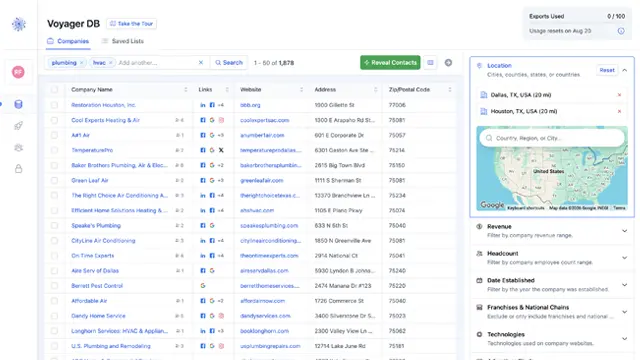
Voyager DB. Voyager DB lets you search millions of small businesses in plain English (for example "accounting firms in Texas with 20 to 50 employees"), then filter by the technologies and ad pixels on their website, revenue, headcount, and location. Company rows are free to browse, so you can check the size of a niche before you spend anything.
At this stage you're just collecting company names, websites, sizes, and tech notes. People come next.
Step 3: Identify the decision maker at each company
Use the company size table from earlier as your guide:
- Small businesses. Check the website's about or team page for the owner or managing partner. Also look for any mention of an outsourced IT partner. That tells you who you'd potentially be replacing.
- Mid-market companies. Search LinkedIn for the company name plus "IT Director", "Head of IT", or "IT Manager".
- Larger companies. Map the CIO or CTO, then one or two directors below them who own the specific area you sell into.
For more tactics, check our guide on how to find B2B decision makers.
Step 4: Find and verify direct emails
This is where most lists fall apart. For each decision maker:
- Work out the email format. Most companies stick to one consistent pattern, like
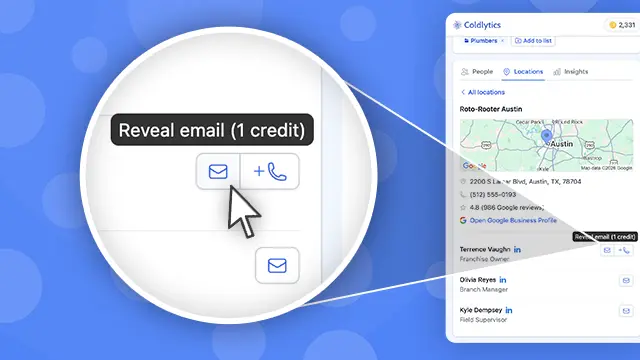
first@company.comorfirst.last@company.com. Find one real address in a press release, a PDF, or the website footer, then apply the pattern. - Use an extension while you browse. With the Coldlytics Chrome extension, visiting a company's website brings up its owners and executives with verified emails right in your side panel. You're only charged a credit if the email actually verifies as valid.
- Work through public sources. Our guide to finding CEO, founder, and owner contact info for free covers 14 methods, from team pages to WHOIS records, and most of them work just as well for IT leaders.
Then verify every address before it goes into a sequence. No exceptions. Bounce rates above roughly 2% start damaging your sender reputation. This matters even more with this audience, because IT decision makers are often the people who set up the spam filter. Make sure your sending domain is authenticated too. Our guide to DKIM, SPF, and DMARC explains how.
Step 5: Enrich, segment, and import
Tag every contact by company size band, industry, main technologies, and role (decision maker or influencer). Those tags let you write a different angle for a law firm owner than for a manufacturer's IT director, and they make it easy to compare reply rates later. If you're on HubSpot or HighLevel, Coldlytics can push contacts straight into your account through our native integrations.
Where to buy an IT decision makers email list
If those five steps sound like a week you don't have, buying is the sensible move. The market basically splits into three kinds of providers, and the right one depends on who you're selling to.
Enterprise sales intelligence platforms. ZoomInfo and Cognism have the deepest coverage of CIOs, CTOs, and IT directors at mid-market and enterprise companies, often with intent data on top. Neither publishes pricing, and contracts are typically annual. If your deals are large and your targets are big companies, they're usually worth the spend.
Self-serve contact databases. Apollo and Lusha are cheaper and let you start for free. Apollo's free plan includes roughly 900 credits a year, with paid plans from $49 per user per month billed annually. Lusha's free plan includes 40 credits a month, and its Starter plan is $49.90 a month. Coverage is strong for companies with a big LinkedIn footprint and thinner at small businesses, where the decision maker is often an owner with no IT title. For a wider comparison, see our roundup of the top B2B data providers.
Small business research providers. This is where Coldlytics fits. The big databases index enterprises, while Voyager DB indexes Main Street. Every record is our own primary research, 9 in 10 contacts are owners or decision makers, and you can filter by the technologies running on each business's website. Every email is validated with ZeroBounce before you're charged, and any bounces are credited back. When the database doesn't cover your whole search, one click hands it to our Contact Research team. Real researchers hand-build the list, deliver it within 24 hours, and keep it exclusive to you for 30 days.
Coldlytics pricing is simple. The free plan includes 25 credits a month, forever, with no card required. A verified email reveal costs 1 credit and a hand-researched contact costs 5 credits. Paid plans start at $49 a month for 250 credits, and unused credits roll over until you cancel.
:::tip Rule of thumb If you sell large platforms to enterprise CIOs, an enterprise data platform is built for you. If you sell IT services or software to companies with under a few hundred employees, you need owner-level, freshly verified contacts, which is exactly what the enterprise tools tend to underserve. :::
:::cta Try Voyager DB free Search millions of small businesses by technology, headcount, and location, then reveal verified owner emails. 25 free credits a month, no card required.
Is it legal to cold email IT decision makers?
Yes in most markets, as long as you follow the rules for each one.
United States. B2B cold email falls under CAN-SPAM, which doesn't require opt-in consent. To stay compliant you need to:
- Use accurate sender information and a truthful subject line
- Include a valid physical postal address in every email
- Offer a clear way to opt out and honor requests within 10 business days
United Kingdom. PECR allows marketing emails to corporate addresses at limited companies without prior consent, as long as you identify yourself and include an easy opt-out. Sole traders and some partnerships are treated like individuals and need consent. UK GDPR still applies to the personal data you hold, so document your legitimate interest.
European Union. GDPR allows B2B outreach under legitimate interest in many cases, but national rules vary. Some countries, Germany in particular, are much stricter about unsolicited email even between businesses.
Canada. CASL permits implied consent when an address is conspicuously published, isn't accompanied by a statement refusing marketing messages, and your message is relevant to the person's role.
:::warning Not legal advice This is general guidance rather than legal advice, so check the rules for each region before you start crossing borders. :::
Getting replies: outreach tips for this niche
IT decision makers are among the most heavily prospected buyers in B2B. A verified list gets you into the inbox. These are what get you a reply:
- Lead with their stack, not your category. "Noticed you're on Microsoft 365 without a third-party backup" beats "we provide managed IT services" every time. Generic IT pitches get deleted on sight.
- Speak to the buyer you actually have. Owners care about downtime, risk, and cost. IT directors care about workload, security posture, and how painful the rollout will be.
- Be technically precise. Phrases like "seamless integration" and "enterprise-grade security" read as fluff to a technical reader. Name the actual integration, the standard, or the number.
- Use a trigger. A new office, a job ad for an IT role, a breach in their industry, or software they run reaching end of support all give you a real reason to write today.
- Keep it short and in plain text. Heavy links and images trip the same filters these readers manage. Start from a proven cold email template and personalize the first line.
- Follow up at least three times. Most replies come from follow-ups, not the first touch. Our guide to cold email follow-ups covers cadence and angles.
FAQ
How much does an IT decision makers email list cost?
Enterprise platforms like ZoomInfo and Cognism are quote-only and sold on annual contracts. Self-serve databases offer free tiers, with paid plans from around $49 a month. On Coldlytics, a verified email reveal costs 1 credit (roughly 20 cents on the Starter plan), and a hand-researched contact costs 5 credits. The free plan includes 25 credits every month.
Who is the IT decision maker at a small business?
Usually the owner, CEO, or managing partner. An office or operations manager often handles day-to-day IT and influences the decision. If the business uses an outsourced IT provider, that provider advises, but the owner still signs.
How do I find a company's CTO or IT manager's email for free?
Find the person's name on LinkedIn or the company's team page, work out the company's email format from any address it publishes, then check your guess with a free email verifier. Our guide to finding executive contact info for free covers 14 methods in detail.
What's the best IT decision makers email list provider?
It depends on who you sell to. For enterprise CIOs and CTOs, ZoomInfo or Cognism offer the deepest coverage. For small and mid-sized businesses, choose a provider with owner-level contacts, technology filters, and email verification before you're charged. That's the model Coldlytics was built on.
What's the difference between an IT email list and an IT decision makers email list?
An IT email list usually means contacts at companies in the IT industry, such as software firms and managed service providers, and is useful if you sell to tech companies. See our IT industry email lists for that. An IT decision makers email list targets the people who buy technology at companies in any industry.
Ready to skip the manual work? Search Voyager DB free, or brief our researchers on your exact IT buyer and get a verified list delivered within 24 hours.
Photo by Austin Distel on Unsplash.
Need a targeted B2B contact list?
Tell us who you're after and our researchers hand-build it within 24 hours. 25 free leads a month, forever.
By signing up, I agree to Coldlytics' Terms of Service and Privacy Policy.