How to Build a B2B Lead List That Converts (7 Steps)
How to build a B2B lead list that gets replies: one decision-maker per company, dedupe against what you own, suppression lists and verified emails.


Most lead lists don't fail because the data is wrong. They fail because the list is built in the wrong order.
You pull every contact a database will give you, export a CSV, and load it into your sequencer. Then three people at the same plumbing company get the same email on the same morning, an existing client gets pitched, someone who unsubscribed last spring hears from you again, and 6% of the list bounces. The copy was fine. The list wasn't.
If you want the definition first, our glossary entry on what a lead list is covers the basics. This guide is the build: the order I'd follow to make a B2B lead list for small businesses that actually gets replies, with the three steps most guides skip. One contact per company, dedupe, and suppression.
What makes a lead list convert
A lead list converts when every row is a business you'd genuinely want as a customer, reached through the one person who can say yes, at an address that works, and nobody on it should have been left off. That last part is where most lists break.
| A list that burns your domain | A list that gets replies | |
|---|---|---|
| Targeting | "Small businesses in Texas" | "Independent roofing companies in Dallas-Fort Worth with 10 to 50 employees" |
| People per company | Everyone the database has | One decision-maker, usually the owner |
| Duplicates | Same business twice (two branches, two spellings) | One row per business |
| Existing relationships | Clients and open deals mixed in | Suppressed before the build |
| Emails | Exported months ago, never checked | Verified within days of sending |
| Generic inboxes | Lots of info@ and office@ |
Named people only |
None of the right-hand column is hard. It's just a matter of doing it in the right order.
How to build a lead list in 7 steps
1Step 1: Write your ideal customer as filters
"Agencies that need clients" is a wish. "Med spas within 20 miles of Phoenix with fewer than 50 Google reviews" is a search.
Write down your best five customers and what they have in common, then translate each trait into something a tool can filter on:
- Industry and niche. Be specific. "Home services" is a category. "Commercial HVAC" is a niche.
- Location. A city with a radius, a list of ZIP codes, a county or a state.
- Size. A headcount or revenue range that can afford what you sell.
- Ownership. Independents only, or franchises only. They buy differently.
- A visible signal. Something that makes them a fit right now: an unclaimed Google profile, a slow website, ad pixels on the site, or a specific technology like ServiceTitan or Shopify.
If you sell to local businesses, the signal is what turns a list into a campaign. Our guide to finding local businesses that need marketing help goes deep on those signals.
2Step 2: Build the company list first
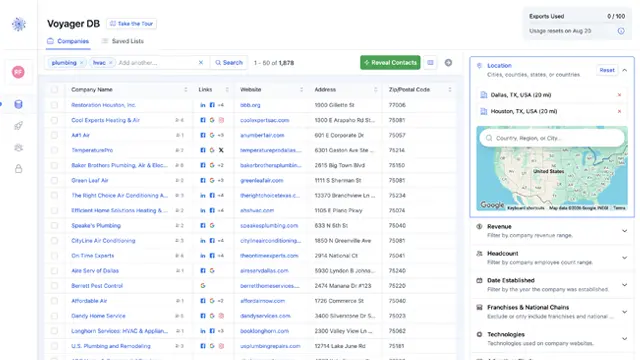
List the businesses before you look for people. It keeps the list focused, lets you check fit at the company level before you spend anything, and makes every later step (dedupe, suppression, one contact per company) far easier, because you're working with one row per business.
Skim the first 50 results by hand. If more than a handful are wrong (a roofing supplier in your roofing contractor list, a national chain in your independents list), tighten the filters now. It's much cheaper to fix the search than to clean the list later.
In Voyager DB, searching and filtering are free, so you can rework a search as many times as you like before you reveal a single contact. You can also search like you'd say it: type "roofing companies in Texas with 10+ employees" and the search assistant suggests the matching filters.
3Step 3: Pick one contact per company
This is where small-business lists differ most from the enterprise playbook.
Most lead list guides tell you to "multithread": add two to four people per account, because big purchases at big companies involve a committee. That's good advice for a 500-person software company. It's bad advice for a nine-person HVAC company, where the owner signs every check and also reads the shared inbox.
Email three people at a small business and one of two things happens. They compare notes and you look like a spammer, or the owner gets your email three times. Either way, you've used three sends to reach one decision-maker.
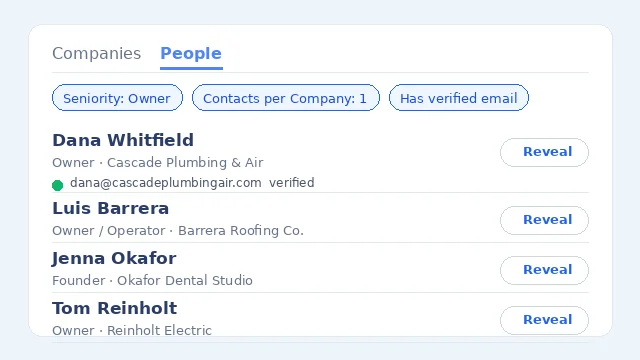
So for Main Street lists, default to one contact per company, the most senior person you can find:
- Owner or founder first. At businesses under about 50 employees, they're the buyer for almost everything.
- A general manager or office manager second, if no owner is listed. At a dental practice or law firm, the practice manager often runs vendor decisions.
- A department head only when you sell something specific to that function and the company is big enough to have one.
To see the difference it makes: in early November 2026, a Voyager DB People search for independent HVAC companies within 25 miles of Denver returned 452 people. Setting Contacts per Company to 1 brought that down to 355, one per business. Those 97 extra rows would have been second and third emails to companies you were already contacting.
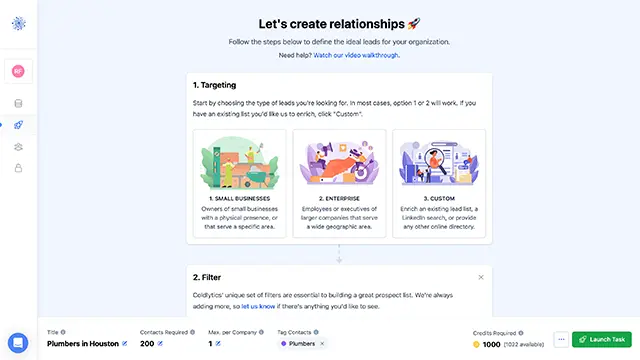
In Coldlytics, Contacts per Company runs from 1 to 50 and always keeps the most senior people first. Branches of one business count as one company, so a plumbing firm with four locations doesn't get four emails. The same setting exists on the Contacts page, so you can send exactly one person per business to your sequencer or CRM even if you own more.
4Step 4: Dedupe against everything you already own
Duplicates sneak in from everywhere: a business you emailed last quarter, a contact you revealed for a different campaign, the same company under two spellings, a branch that looks like a separate business.
Dedupe at the company level, not just by email address. Two different people at the same company aren't duplicate emails, but they are a duplicate business, and that's what the owner notices.
Check your new list against:
- Every contact you already own, from any source.
- Your saved lists and past campaigns, so nobody gets the same pitch twice.
- Your CRM, so you don't cold-pitch an open deal.
Voyager DB has three switches for this: Deduplicate My Contacts, Deduplicate Saved Lists and Deduplicate Suppression List. Each one hides companies you already have before you reveal anything. "Deduplicate My Contacts" is on by default for reveals and research tasks, so you never pay twice for the same contact.
5Step 5: Load your suppression list before you build
Dedupe stops you paying twice. A suppression list stops you emailing people you should never email at all. Build it once, keep it updated, and apply it to every list:
- Current clients and their domains
- Open deals and anyone in an active sales conversation
- Unsubscribes and "please remove me" replies, from every tool you've ever sent from
- Hard bounces
- Competitors, partners and your own team's domains
- For agencies, every client's customer list they've asked you not to contact
Suppress domains as well as individual emails. If an existing client's office manager replies "we already work with you," you want the whole company off the list, not just her address.
In Coldlytics, the suppression list lives in Settings. Paste or upload a CSV of emails and domains (up to 500,000 entries), and both research tasks and the Voyager dedupe switch leave them out. Each research task can also carry its own suppression list, which is handy when one client hands you a do-not-contact file. Suppressed contacts are dropped before billing, so you don't pay for them either.
6Step 6: Verify every email right before you send
Email addresses go stale. People leave, businesses close, inboxes get shut down. A list that verified clean in the summer won't be clean in the fall.
Two numbers matter:
- Bounce rate. Keep it under 2%. Above that, your sending domain's reputation starts to slide and more of your email lands in spam.
- Spam complaint rate. Google's sender guidelines ask bulk senders to stay under 0.3% and recommend under 0.1%. A tight, relevant list with one contact per company is the easiest way to stay there.
Verify as close to the send date as you can, and re-verify anything older than about three months. Drop invalid addresses and handle catch-alls (servers that accept every address) with care, ideally in a separate, smaller send.
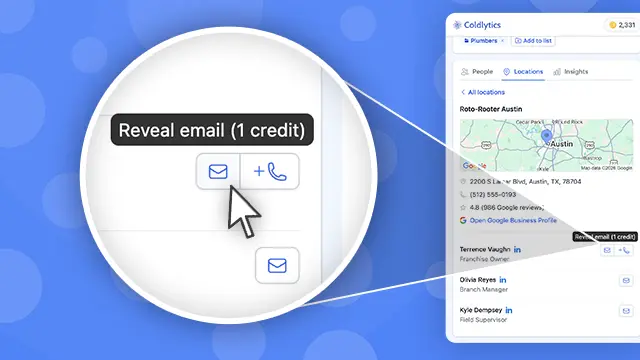
Coldlytics verifies every email with ZeroBounce at reveal time and only charges for valid ones. Catch-alls are free on instant reveals, and if a verified email bounces, we credit it back.
7Step 7: Tag, segment and send
Before you load the list, tag every row with where it came from, when it was verified and which campaign it's for. Six weeks from now, when one segment replies at 8% and another at 1%, the tags are how you find out why.
Segment by the thing your first line will mention: niche, city, or signal. "HVAC companies in Denver with no Google Ads pixel" gets its own campaign and its own opener.
Then get the list into your sending tool without the CSV shuffle. From the Coldlytics Contacts page you can send contacts straight to Instantly, Smartlead or lemlist, into HighLevel or HubSpot, or into a Clay table. Set Contacts per Company to 1 on the way out and you'll send exactly one person per business.
Build, buy or brief a researcher?
There are three ways to fill the list. Most people end up using all three.
| Build it by hand | Pull it from a database | Brief human researchers | |
|---|---|---|---|
| Best for | 10 to 30 dream accounts | Hundreds of businesses in common niches | Tight niches the database doesn't cover |
| Time | 10 to 20 minutes per contact | Minutes for the whole list | Delivered to you, usually within 24 hours |
| Freshness | As fresh as it gets | Depends on the provider | Researched for you, on demand |
| Cost | Your time | From cents per contact | More per contact, less of your time |
| Watch out for | It doesn't scale | Generic inboxes and stale data | Write a clear brief |
Building by hand is covered in our guide to finding a founder's or CEO's contact info. If you're not sure who the decision-maker even is in your target market, start with how to find B2B decision makers.
For bought lists, be careful. A pre-made list sold to everyone in your niche has been emailed by everyone in your niche. If you buy, buy from a source that verifies at the point of sale and lets you filter it yourself.
This is where Coldlytics fits. Voyager DB covers millions of US small businesses, built by our own team and never bought in, and 9 in 10 of the people in it are owners or decision-makers. A verified email costs 1 credit and you only pay for valid ones. When a search runs dry, one click hands it to our Contact Research team with your filters carried over: they find the decision-makers, verify every email and deliver up to 1,000 leads within 24 hours on business days, exclusively yours for 30 days. Researched contacts cost 5 credits each, with a minimum of 20 per task.
If you want to see what a finished niche list looks like, our construction email list page walks through one end to end, from the search to the export.
Lead list mistakes that kill reply rates
- Starting with people instead of companies. You lose control of how many people you email at each business.
- Keeping generic inboxes.
info@andoffice@rarely reach the person who signs the check. They also tend to bounce or get flagged more. - Mixing niches in one campaign. Dentists and roofers need different first lines. If they share a campaign, they share a generic one.
- Treating branches as separate businesses. Four locations, one owner, four identical emails.
- Forgetting old unsubscribes. If you've changed sending tools, export the unsubscribes from the old one into your suppression list before you send.
- Building once and never refreshing. A list is a snapshot. Re-verify before each new campaign, and flag bad contacts as you find them.
Keeping the list healthy
A good lead list isn't a file, it's a process. A few habits keep it working:
- Feed every outcome back. Replies, bounces, "wrong person" and "not interested" all update either the CRM or the suppression list.
- Flag bad leads. In Coldlytics, you can flag a contact as bounced, wrong person or mistargeted within 30 days, and we review it and return the credits for leads that weren't up to standard.
- Refill, don't stretch. When a segment runs out, widen the location or add an adjacent niche. Don't loosen the targeting until the list stops making sense.
FAQ
What's the difference between a lead list and a prospect list?
People use the terms interchangeably. Strictly, a lead list is everyone who fits your criteria, and a prospect is someone you've qualified or who has engaged. In practice, a cold outbound list is a lead list until people reply.
How big should my lead list be?
Work backward from your goal. If you want 10 meetings a month and your campaigns typically turn 1% of contacts into meetings, you need about 1,000 contacts a month. Start with a few hundred per segment so you can test the message before you scale it.
How often should I update a lead list?
Re-verify emails before every new campaign, and treat anything older than about three months as unverified. Update your suppression list continuously, ideally every time someone replies, bounces or unsubscribes.
Is it legal to email a lead list in the US?
Yes, B2B cold email is legal under CAN-SPAM if you follow the rules: an accurate "from" line and subject, your physical mailing address, and a clear way to opt out, honored within 10 business days. The FTC's compliance guide has the details. This is general guidance, not legal advice.
Need a targeted B2B contact list?
Tell us who you're after and our researchers hand-build it within 24 hours. 25 free leads a month, forever.
By signing up, I agree to Coldlytics' Terms of Service and Privacy Policy.