What Is HighLevel? A 2026 Guide for Agencies (and How to Fill Every Sub-Account With Leads)
What HighLevel is, what agencies use it for, what it costs in 2026 ($97 to $497 a month) and how to keep every client sub-account full of verified, ready-to-work leads.


If you run an agency that sells to local businesses, someone has told you to "just put it all in HighLevel." A client, a mastermind, a YouTube thumbnail with a shocked face. It comes up constantly.
It comes up in our support chat too. A big share of Coldlytics customers run their agencies on HighLevel, which is why it was the first CRM we built a native integration for.
So here's a plain-English guide: what HighLevel actually is, what agencies use it for, what it really costs in 2026, and the one job it doesn't do for you, which is filling all those client accounts with people worth talking to.
What is HighLevel?
HighLevel is an all-in-one sales and marketing platform for agencies and small businesses. You'll still see it called GoHighLevel, which is how a lot of people search for it. It was founded in 2018 by Shaun Clark, Varun Vairavan and Robin Alex, it's headquartered in Dallas, and by its own count it powered 2.2 million businesses in 2025.
At its core is a CRM with pipelines. Around that sits almost everything a local marketing agency sells: websites and funnels, forms, booking calendars, two-way email and SMS, phone and call tracking, review management, social posting, workflow automation and reporting.
The part that makes it an agency tool rather than just another CRM is the account structure:
- Agency account. Your umbrella login. You manage billing, users and settings for every client from here.
- Sub-accounts. One per client (HighLevel also calls them locations). Each has its own contacts, pipelines, calendars, phone numbers, sending domain and automations.
- Snapshots. Templates of a whole sub-account: funnels, workflows, pipelines and calendars. Build your "dental practice" setup once, then load it into every new dental client in minutes.
- White label. Put your own domain and branding on the app, so clients log in to "your" platform instead of HighLevel.
If you've ever paid for a CRM, a funnel builder, a scheduler, an SMS tool and a review tool separately for every client, you can see the appeal.
What agencies actually use HighLevel for
Here's how the main features map to the work an agency does for a local client:
| Feature | What agencies use it for |
|---|---|
| CRM and pipelines | Tracking every lead from first touch to booked job, per client |
| Websites, funnels and forms | Landing pages for ad campaigns, quote request forms, lead magnets |
| Booking calendars | Letting leads book a consult, estimate or appointment without a phone call |
| Conversations (email, SMS, calls) | One inbox for every channel, so no lead sits unanswered |
| Workflows | Speed-to-lead texts, missed-call text-back, follow-up sequences, review requests |
| Reputation management | Asking happy customers for Google reviews, then replying to them |
| Reporting | Showing the client which campaigns produced leads and appointments |
| AI features | Chat and voice agents that answer and qualify leads (usage-based, plus optional add-ons) |
For most agencies, the killer use is simple: you run the ads or the SEO, and HighLevel makes sure the leads that come in actually get answered, followed up and booked. That's what keeps clients renewing.
How much does HighLevel cost in 2026?
HighLevel has three self-serve plans, plus a custom Enterprise plan. All of them include unlimited contacts and unlimited users, and every plan has a 14-day free trial.
| Starter | Unlimited | Agency Pro | |
|---|---|---|---|
| Monthly price | $97 | $297 | $497 |
| Annual price | $970 | $2,970 | $4,970 |
| Sub-accounts | 3 | Unlimited | Unlimited |
| Rebill phone and email usage to clients | No | Yes, at cost | Yes, with your markup |
| SaaS Mode (sell it as your own software) | No | No | Yes |
| Automated sub-account creation | No | No | Yes |
| API access | No | Basic | Advanced |
Source: HighLevel pricing, checked October 22, 2026.
The subscription isn't the whole bill. Phone calls, SMS, email sending and AI are usage-based and paid from a prepaid agency wallet. There are also optional add-ons, for example:
- AI Employee: $50 a month per sub-account on its Growth tier, or $97 on its Unlimited tier
- SEO tools: $79 a month per sub-account
- Branded client portal app: $49 a month per sub-account
- White-label mobile app: $497 a month
- HIPAA compliance: $297 a month (worth knowing if you work with dental or medical clients)
- Dedicated email IP: $59 a month per IP
Is HighLevel worth it for your agency?
It depends less on HighLevel and more on what you sell.
It's a great fit if:
- You sell lead generation to local businesses (ads, SEO, websites) and want to prove results with booked appointments, not just clicks.
- You manage several clients and you're tired of rebuilding the same setup in five different tools.
- You want a recurring software line on your invoices, whether that's a flat "CRM and automation" fee or a full white-labeled SaaS offer.
Think twice if:
- You're a solo freelancer doing one-off projects. You'll pay for a lot of platform you don't use.
- Your clients already run a CRM they love, such as a field-service tool or practice management software, and won't switch.
- Nobody on your team wants to own the setup. HighLevel is powerful, but somebody has to build and maintain the workflows and snapshots.
One honest warning: HighLevel makes it easy to offer a lot. It doesn't make clients any easier to find.
The one thing HighLevel doesn't do: fill your pipeline
A sub-account with no leads in it is a very well-organized empty room.
HighLevel does have a built-in Prospecting Tool. You search local businesses by keyword and location, then generate a marketing audit report that shows gaps in their listings and reviews. It's genuinely useful as a conversation starter. But it's built around audits, not around finding and verifying the owner's direct email at scale. Per HighLevel's help docs, the basic version is capped at 50 prospects a day, searches cover a radius of up to about 31 miles, and the premium version that lifts the cap costs extra.
HighLevel is also very clear about cold email. Its email sending guide says cold email from its built-in email service is "generally not recommended, especially for new domains." It recommends validating every address, never using your primary sending domain, and using purpose-built cold email tools to qualify leads before moving them into the platform. Its sending health guide adds: never import purchased or scraped lists.
That's good advice, and it tells you how the stack should look:
| Job | Where it lives |
|---|---|
| Finding the right businesses and the owner's verified contact details | A small-business contact database like Coldlytics |
| Cold outreach | A dedicated sequencer, such as Instantly, Smartlead or lemlist, on a separate sending domain |
| Working the lead once it's warm | HighLevel: pipeline, booking, SMS, workflows and reporting |
How to fill every sub-account with leads in 5 steps
This works for two kinds of sub-account: your own agency's (finding your next clients) and your clients' (finding customers for clients who sell to other businesses, like a commercial cleaning company or a roofing contractor that wants property managers).
1Step 1: Define the target for each sub-account
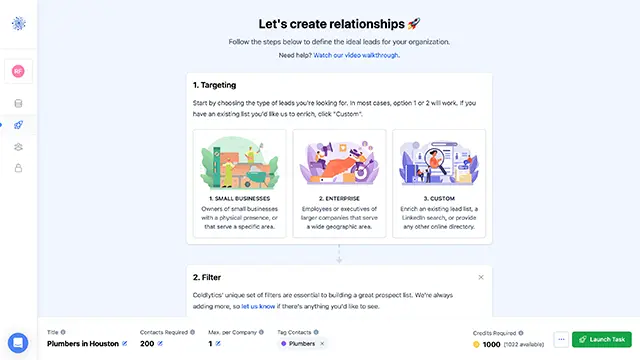
Write one sentence per sub-account: who, where and why now.
- Your agency: "Independent med spas within 20 miles of Phoenix with fewer than 50 Google reviews."
- A commercial cleaning client: "Dental and medical offices in Dallas County with 10 to 50 employees."
- A roofing client: "Property management companies in Tampa and St. Petersburg."
If you can't write the sentence, the list will be vague and so will the outreach.
2Step 2: Build the list from signals, not just categories
A list of "dentists in Florida" is a phone book. A list of "dentists in Florida with unclaimed Google listings and no ad pixel on their site" is a list of businesses with a visible problem you can fix.
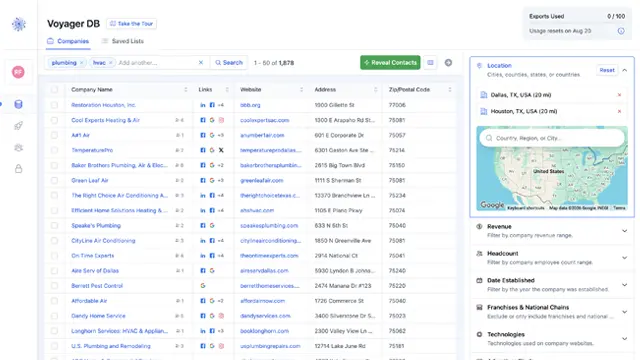
In Voyager DB you can filter 10M+ small businesses across 325 categories by location (down to ZIP code), headcount, revenue, Google review count and rating, claimed or unclaimed profile, ad pixels, page speed, franchise vs independent, and 213 website technologies. Or just type it the way you'd say it, "med spas within 20 miles of Phoenix with fewer than 50 Google reviews", and the search builds the filters for you.
One filter worth knowing if you're in the HighLevel world: HighLevel itself is one of the technologies we detect. That's useful two ways. Exclude it when prospecting for your agency, since a business already on HighLevel probably has an agency (or is one). Include it if you sell services to businesses that already run on it, like snapshot setup, automation builds or HighLevel support.
3Step 3: Verify, dedupe and keep one owner per business
This is where most lists go wrong, and it's exactly what HighLevel's guidance is warning you about.
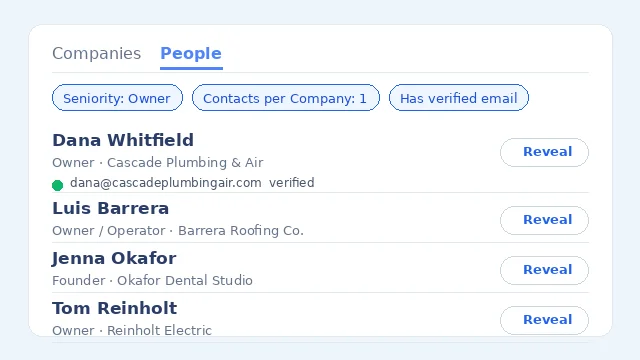
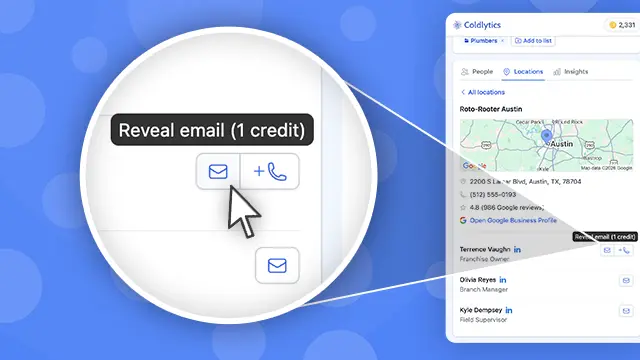
- Verify every email. In Coldlytics, every email is checked with ZeroBounce when you reveal it, and you only pay for valid ones. Catch-alls are free on instant reveals.
- One decision-maker per company. Set Contacts per Company to 1. At a 12-person roofing company, the owner decides. Emailing three people at the same office just looks like spam. 9 in 10 people in Voyager DB are owners or decision-makers.
- Keep clients apart. Tag contacts by client, and upload each client's existing customers and any opt-outs as a suppression list so they're never prospected.
When the database runs out for a narrow brief, hand it to our Contact Research team. Human researchers build the list to your exact criteria, up to 1,000 leads within 24 hours on business days, and those contacts stay exclusive to you for 30 days.
4Step 4: Run the cold outreach in a sequencer
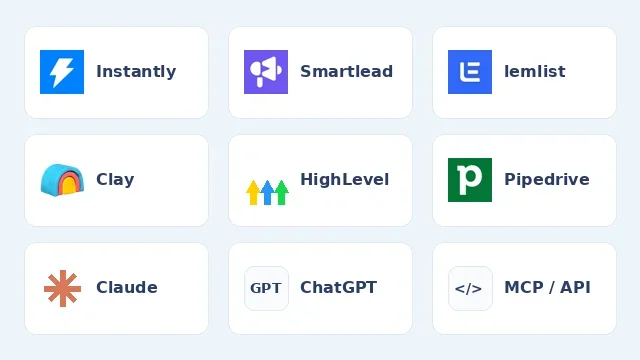
Send contacts straight from Coldlytics into an Instantly, Smartlead or lemlist campaign, with no CSV in between. Send from a secondary domain, warm it up, stay around 30 emails a day per inbox, and keep bounces under 2%.
Keep it short and specific. Lead with what you noticed about the business, offer one useful thing, and follow up three times with a different angle each time. Our cold email guide for agencies has templates, and our follow-up guide covers cadence.
5Step 5: Push contacts into the right sub-account and let HighLevel work
Here's where HighLevel earns its keep. Coldlytics has a native HighLevel integration, listed on the HighLevel marketplace:
- Connect once with your agency login, then pick the sub-account each time you send. Each client's leads land in their own account.
- Map the extra fields. HighLevel has no standard field for job title or LinkedIn profile, so you map them to custom fields once and every push follows the same rules. Companies come across too.
- Send what your filters show. Filter Contacts by tag, task or date added and send everything that matches, or just the rows you tick. Re-sending is safe because contacts match on email, so you top up a pipeline without duplicates. Every push is logged in Sync History.
When to push is up to you. HighLevel's own advice is to move leads in once they engage, so the cleanest setup is to send contacts across when they reply. If you'd rather track the whole campaign in HighLevel, push the list into an early pipeline stage and keep those contacts out of email and SMS workflows until they respond.
Once contacts are in the sub-account, use what HighLevel is good at: a pipeline stage for "replied," a booking link in your reply, a workflow that texts a reminder before the call, and a dashboard the client can see. The full walkthrough is in our integrations announcement.
Mistakes agencies make with HighLevel
- Importing a bought CSV straight into a sub-account and blasting it. It burns the sending domain your client's real customers rely on. Run cold outreach in a sequencer first.
- Sharing one sending domain across sub-accounts. HighLevel itself recommends a dedicated domain per sub-account, so one client's mistake doesn't hurt the others.
- Building every client from scratch. Make a snapshot per niche and reuse it.
- Selling software instead of outcomes. Owners don't buy "a CRM." They buy "every lead gets a text back in 60 seconds and booked on your calendar."
- Leaving sub-accounts empty. A beautiful pipeline with nothing in it won't keep a client past month three.
FAQ
Is HighLevel a CRM?
Yes. A CRM with pipelines is the core of it, but it also replaces a website and funnel builder, a booking tool, email and SMS marketing, review management and workflow automation. That's why it's usually described as an all-in-one platform.
Can you white label HighLevel?
Yes. You can put your own domain and branding on the web app, so clients log in to your platform. A white-label mobile app is a separate add-on at $497 a month, and Agency Pro's SaaS Mode lets you sell HighLevel as your own software with your own pricing.
Does HighLevel have a free trial?
Yes. Every self-serve plan comes with a 14-day free trial. Billing starts automatically when the trial ends unless you cancel, and usage-based charges for phone, SMS and email can apply during the trial.
Need a targeted B2B contact list?
Tell us who you're after and our researchers hand-build it within 24 hours. 25 free leads a month, forever.
By signing up, I agree to Coldlytics' Terms of Service and Privacy Policy.