Best Apollo Alternatives for Agencies in 2026
Apollo alternatives for agencies selling to small businesses: 6 tools compared on owner coverage, real cost per contact, phone credits and rollover.


Apollo is a great tool. If you sell software to a 200-person tech company, it's hard to beat on price.
But a lot of agencies don't sell to tech companies. They sell SEO to roofers, ads to med spas and websites to law firms. And that's where Apollo starts to feel like the wrong tool: you search for HVAC companies in Denver, the owners aren't there, phone numbers cost 8 credits each, and whatever you don't use disappears at the end of the month.
I've gone through the pricing pages of Apollo and five alternatives (all checked on November 9, 2026) and picked the ones that make sense if your buyers are small business owners. For each one you'll find what it's good at, what it costs, and where it falls short. If you only want Apollo's numbers, our Apollo.io pricing breakdown covers every plan and credit.
Why agencies look for an Apollo alternative
Most agencies don't leave Apollo because it's bad. They leave because it was built for a different buyer. Here's where the friction usually shows up:
- The owner isn't there. Apollo advertises 240M+ contacts and 30M companies, and that data is deepest in tech, SaaS and the mid-market. A nine-person plumbing company often has no LinkedIn presence for the database to pick up, so the person who signs the check is missing.
- Phones are expensive. A verified email costs 1 credit on Apollo, but a phone number costs 8. If you sell to trades, where the owner answers the phone, that adds up fast.
- Credits expire. Apollo's FAQ is blunt: "Unused credits expire at the end of each billing cycle and do not carry over." Agencies prospect in bursts, so lumpy months cost you.
- Every seat pays. All seats on an Apollo account have to be on the same plan, so adding a VA or a junior account manager means another full seat.
- Client work needs a different agreement. Apollo's pricing page says its plans "are for internal business use only" and that using Apollo data to "share with customers, or resell is not permitted under standard terms." If you build lists for clients or run outbound as a service, that matters.
None of these are dealbreakers for an in-house SaaS sales team. For an agency selling to Main Street, they're most of the job.
What to look for in an Apollo alternative
Before you compare logos, decide what you actually need. For agencies selling to small businesses, these are the questions that matter:
| What to check | Why it matters if you sell to small businesses |
|---|---|
| Owner coverage in your niche | At a business under 50 people, the owner is the buyer. If the tool returns office managers and generic inboxes, you're paying for the wrong rows |
| Cost per usable contact | Divide what you'd spend by the owners you'd actually email, not by the credits you get |
| Phone pricing | Trades and local services pick up the phone. A tool that charges 5 to 8 credits per number changes your math |
| Local signals | Google reviews, unclaimed listings, ad pixels and slow websites tell you who needs your service right now |
| Unused credits | Roll over, roll over with a cap, or expire. This is the hidden cost for agencies with uneven months |
| Seats | Per-seat pricing punishes small teams with part-time users |
| Client use | If you deliver lists to clients or run campaigns on their behalf, check the terms before you build a service on top of a tool |
| What happens when the data runs out | A database ends. Some tools let you hand the rest to a person |
The best Apollo alternatives at a glance
Prices are in USD, for one user on monthly billing unless noted, as listed on each vendor's pricing page on November 9, 2026.
| Tool | Best for | Entry paid plan | Phone numbers | Unused credits |
|---|---|---|---|---|
| Apollo.io (for reference) | Tech and mid-market prospecting with built-in sequences | $65 per seat a month (or $49 per seat a month billed annually), 2,500 credits a month | 8 credits | Expire every billing cycle |
| Coldlytics | Local and Main Street business owners | $49 a month, 250 credits, 2 seats included | 1 credit per direct dial | Roll over while subscribed |
| UpLead | Simple per-contact pricing with email and mobile together | $99 a month, 170 credits | Included (1 credit per contact) | Not stated on the pricing page |
| Lusha | Quick lookups from a browser extension | $49.90 a month, 400 credits | 5 credits | Roll over on monthly plans, up to 2x the monthly amount |
| Hunter | Finding emails when you already have the business websites | $49 a month, 2,000 credits, unlimited users | Not listed on the pricing page | Monthly credits don't roll over |
| RocketReach | Looking up named people by email and phone | Varies with billing period and seats | From the Pro plan up | Monthly plans meter lookups |
| D7 Lead Finder | Fast, cheap lists of local businesses by keyword and city | Month-to-month plans priced by searches per day | Business phone included | Daily search allowance |
1. Coldlytics: best for local business owners
Full disclosure: this is our product. I'm putting it first because it was built for exactly this problem, and I'll be as specific about where it doesn't fit as I am with everyone else.
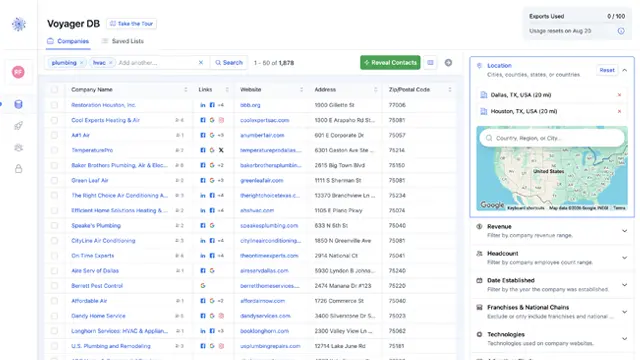
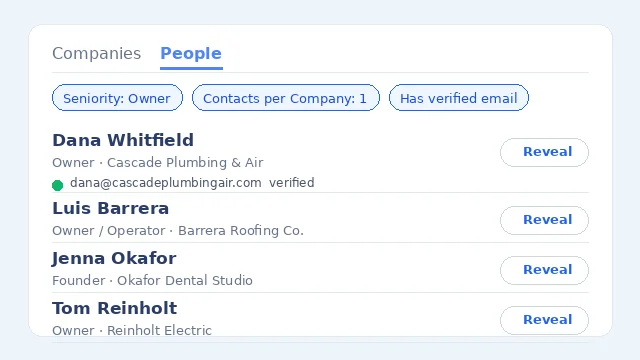
The big databases index enterprises. Coldlytics indexes Main Street. Voyager DB covers 10M+ small businesses and about 1M people, and 9 in 10 of those people are owners or decision-makers. The data is built and maintained by our own team, never bought in.
What agencies use it for:
- Filters the big databases don't have. Google review count and rating, unclaimed Google listings, Facebook, Google, LinkedIn and TikTok ad pixels, page speed, residential vs commercial trades, franchise vs independent, 213 website technologies and ZIP code targeting. "Med spas within 20 miles of Phoenix with fewer than 50 reviews" is a real search. Our guide to finding local businesses that need marketing help shows how agencies use these signals.
- A human fallback. When a search runs dry, one click hands it to our Contact Research team with your filters carried over. They find the decision-makers, verify every email and deliver up to 1,000 leads within 24 hours on business days. Researched contacts stay exclusive to you for 30 days.
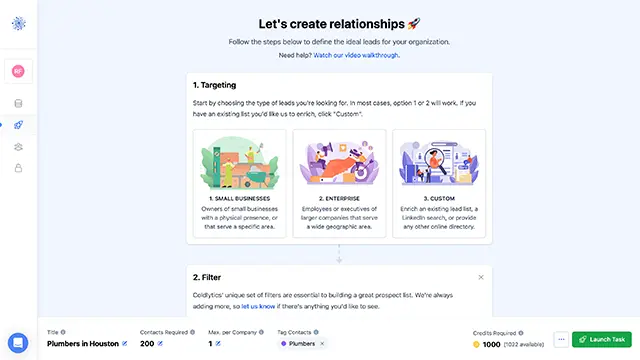
- Built for client work. Push contacts into multiple HighLevel sub-accounts with custom field mapping, or straight into Instantly, Smartlead, lemlist or Clay. Tags keep each client's list separate, and suppression lists keep current clients and unsubscribes out.
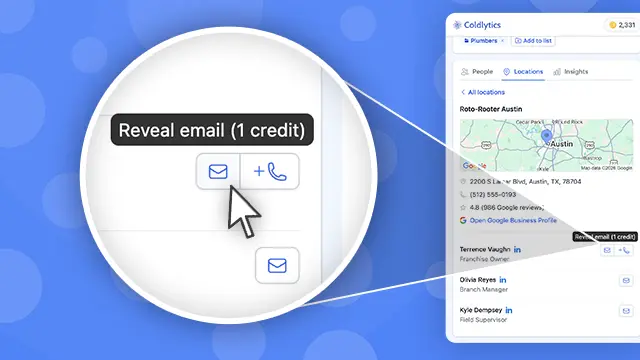
Pricing: Free gives you 25 credits a month, forever, with no card. Starter is $49 a month for 250 credits, Growth is $99 for 750 and Pro is $299 for 2,500, with a custom Agency plan for pooled credits and dedicated research capacity. A verified email or a direct dial costs 1 credit, and you only pay for valid emails. A researched contact costs 5 credits, with a minimum of 20 per task. Paid credits roll over every month while you're subscribed, and seats are included (2, 5 or 10, then $19 a month each).
Where it falls short: Coldlytics is a small-business database, not a bigger one. If you sell to enterprise buyers or need Fortune 500 org charts or intent data, Apollo or ZoomInfo are better fits. It also doesn't send email: you push contacts into your sequencer or CRM.
2. UpLead: best for simple per-contact pricing
UpLead keeps the math easy. One credit unlocks one contact, and that includes both the email and the mobile direct dial. That makes it one of the few tools where phone-first outreach doesn't cost extra per contact.
Pricing: a 7-day free trial with 5 credits. Essentials is $99 a month for 170 credits, and Plus is $199 a month for 400 credits. Extra credits cost $0.60 on Essentials and $0.50 on Plus. Monthly plans have no contract. Professional is annual only and quoted by sales.
Good for agencies because: suppression list uploads (on Plus) let you exclude existing clients and past contacts, and it integrates with HubSpot, Pipedrive, Close, lemlist and others.
Where it falls short: at $99 for 170 contacts, it's one of the pricier options per contact. Small-town owners are the hardest records for any database to hold, so check a few local niches on the trial before you commit. We also have a side-by-side of UpLead vs Apollo.io.
3. Lusha: best for quick lookups while you browse
Lusha is built around its browser extension: you look at a profile or a company site and reveal an email or a phone number on the spot. It's quick and easy to roll out to a small team.
Pricing: the Free plan has 40 credits a month. Starter is $49.90 a month on monthly billing for 400 credits a month ($37.45 a month billed annually). Pro is $69.90 a month for 600 credits ($52.45 a month billed annually). A verified email costs 1 credit and a phone number costs 5.
Good for agencies because: on monthly plans, unused credits roll over as long as you're subscribed, up to twice your monthly allowance. That's kinder to lumpy prospecting months than Apollo's expiring credits.
Where it falls short: at 5 credits a number, a phone-heavy campaign still eats credits quickly, and on annual plans unused credits reset at the end of the year. And as with any large database, test it on your local niches first: the owner of a three-truck landscaping company is a much harder record to find than a SaaS sales manager.
4. Hunter: best when you already have the websites
Hunter started as an email finder and still does that job well. Give it a company's domain and Domain Search returns the email addresses it can find for that company, and Email Finder looks up a specific person's address at that company.
That makes it useful for local prospecting if you already have a list of businesses with websites, for example from Google Maps or a directory, and you need the emails behind them.
Pricing: the Free plan has 50 credits a month. Starter is $49 a month for 2,000 credits a month ($34 a month billed annually), Growth is $149 for 10,000 and Scale is $299 for 25,000. One credit finds one email, and searches that find nothing are free. Every plan includes unlimited team members, which is rare.
Where it falls short: it's email-first, not a phone tool. It also only knows the people it can find on the web, so at a small business you may get the generic inbox or a staff member rather than the owner. On monthly billing, credits reset each month and don't roll over.
5. RocketReach: best for looking up named people
RocketReach is a people-lookup tool. If you know who you want to reach (an owner's name from a Google listing or a news article), it's good at finding their email and phone.
Pricing: the plan structure is what matters most here. Essentials is email only. Phone numbers start on Pro. On monthly billing you get a fixed number of lookups (100, 250 or 1,000 a month depending on the plan). On annual billing lookups are unlimited, but exports are capped at 1,200, 3,600 or 20,000 a year. Prices change with billing period and seat count, so check RocketReach's pricing page for the current US price.
Where it falls short: it works best one name at a time. For building a fresh list of, say, every independent roofer in Dallas, you'll want a tool that starts from companies rather than people.
6. D7 Lead Finder: best for cheap, fast local business lists
D7 Lead Finder is the closest thing to a Main Street scraper you can buy off the shelf. You type a keyword and a location ("plumbers in Miami, FL") and get back a list of local businesses, usually 300 to 1,200 per search, with emails and website URLs, postal address, phone and social profiles. Higher plans add data such as ad pixel detection and review scores.
Pricing: three month-to-month plans priced by how many searches you can run a day: 10, 30 or 100, which D7 estimates at about 3,500, 10,000 or 30,000 leads a day. You can cancel any time, and there's no long-term commitment.
Where it falls short: you get business-level data, not a named, verified decision-maker. Whatever emails a business lists on its site are what you'll work with, so verify everything before you send. The daily allowance resets every day, so unused searches don't build up.
How to switch from Apollo without losing a month
1Step 1: Export what you've already paid for
Before you cancel, export your saved contacts and lists. Credits don't roll over on Apollo and cancellations take effect at the end of your plan term, so use what's left of the cycle first.
2Step 2: Export your unsubscribes and bounces
This is the step people forget. Pull every unsubscribe, bounce and "please remove me" from Apollo's sequences and load them into your new tool's suppression list before you send a single email.
3Step 3: Test your three best niches
Run the same three searches on two or three alternatives. Count named owners with verified emails, not total rows. If you rely on the phone, count direct dials too.
4Step 4: Work out cost per usable owner
Divide what you'd pay each month by the owners you could actually email. It's the only fair way to compare a $49 plan with 2,500 credits against a $49 plan with 250.
5Step 5: Set one contact per company and connect your sequencer
At small businesses, one decision-maker per company is the right default. Set that before you export, then push contacts straight into your sequencer or CRM. Our guide to building a lead list that converts walks through dedupe and suppression in detail.
When you should stay on Apollo
I'll be straight: plenty of agencies should keep Apollo.
- Your clients sell to tech companies, SaaS or the mid-market. That's where Apollo's data is deepest and its credits go furthest.
- You want data and sending in one login. Sequences, a dialer and CRM sync are all built in.
- You use every credit, every month. High, steady volume gets the best price per contact.
- You only need emails. At 1 credit per email, Apollo is very cheap if you skip phone numbers.
Some agencies run both: Apollo for tech and mid-market clients, and a Main Street tool for local ones. For more head-to-heads, see our Apollo.io alternatives list, Adapt vs Apollo.io and our review of the Apollo Chrome extension. If you're still working out which niche to sell to, our agency niche report analyzed 18,370 agency briefs.
FAQ
What's the best Apollo alternative for small businesses?
It depends on who you sell to. If your buyers are local business owners, pick a tool built for Main Street data and test it in your niche. Coldlytics was built for that. If you sell to tech or mid-market companies, UpLead, Lusha and RocketReach are closer like-for-like swaps for Apollo's database.
Is there a free Apollo alternative?
Several tools have a free plan you can keep using: Coldlytics (25 credits a month, forever, no card), Hunter (50 credits a month) and Lusha (40 credits a month). UpLead has a 7-day trial with 5 credits. Free plans are best used to test coverage in your niche before you pay.
Can agencies use Apollo data for client campaigns?
Check your agreement. Apollo's pricing page says its standard plans are for internal business use only, and that sharing Apollo data with customers or reselling it needs a separate agreement with custom pricing. Read the terms of any data tool before you build a client service on it.
Is Clearbit still an Apollo alternative?
Not as a standalone tool. HubSpot acquired Clearbit, and Clearbit no longer offers new standalone subscriptions. Its enrichment now lives inside HubSpot, and the free Clearbit tools were shut down in April 2025. If you're a HubSpot shop, it's worth a look for enriching inbound leads, but it isn't a prospecting database you can buy on its own.
Which Apollo alternative is cheapest for phone numbers?
On the plans we checked, Coldlytics charges 1 credit per direct dial on instant reveals and UpLead includes the mobile number in its 1 credit per contact. Lusha charges 5 credits per phone number and Apollo charges 8.
Pricing and plan details for Apollo.io, UpLead, Lusha, Hunter, RocketReach and D7 Lead Finder checked on each vendor's website on November 9, 2026. Prices change, so confirm before you buy.
Need a targeted B2B contact list?
Tell us who you're after and our researchers hand-build it within 24 hours. 25 free leads a month, forever.
By signing up, I agree to Coldlytics' Terms of Service and Privacy Policy.